Feature Line Extraction – Part II: Salience, Clustering, and Consolidation
Abstract

Feature lines are among the most expressive geometric descriptors of a surface. They reveal where curvature concentrates, where a shape bends sharply, and where structural transitions occur. In Feature Line Extraction – Part I, we developed a complete pipeline for extracting ridges, valleys, and creases directly from triangle meshes by using curvature fields and adjacency traversal. That pipeline produces a dense set of polylines that faithfully captures the mesh’s geometric behavior.

High-resolution CAE meshes, however, introduce a new challenge: curvature-based extraction often generates many parallel feature lines, sometimes separated by only one triangle. These lines are not noise; they are valid curvature ridges. Yet their density makes them impractical for downstream tasks such as segmentation, patch extraction, and remeshing.

This article presents the second stage of the feature-line pipeline: salience analysis, clustering, and consolidation. Its purpose is to reduce a dense collection of raw feature lines to a compact set of meaningful structural lines suitable for segmentation and engineering workflows.
The Problem: Parallel Feature Lines in High-Resolution Meshes

Curvature-based extraction responds to local geometric variation. On a smoothly curved region:

  • Curvature changes gradually.
  • Many edges satisfy the ridge or valley thresholds.
  • Adjacency tracing produces multiple neighboring polylines.
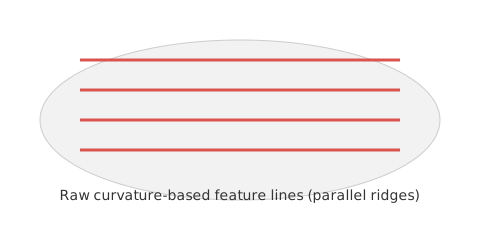
  • Each polyline may be offset from the next by only one triangle.

The result is a family of parallel lines that all describe the same underlying geometric feature.

This effect is especially pronounced in CAE meshes because they often combine:

  • High mesh resolution.
  • Small triangles.
  • Smooth curvature transitions.
  • Low dihedral angles, even near sharp features.

The raw extraction is geometrically valid, but it is more detailed than downstream workflows require.

Segmentation, remeshing, and shape analysis need structural feature lines—not every local ridge.

A second processing stage is therefore required: feature-line consolidation.

Figure 1: Parallel Feature Lines Illustration.
Consolidation Pipeline Overview

The consolidation pipeline consists of four stages:

  1. Compute geometric descriptors for every raw feature line:
    • Centroid.
    • Principal direction.
    • Length.
    • Curvature contrast.
    • Curvature variance.
  2. Cluster parallel lines into bands using:
    • Direction similarity.
    • Centroid proximity.
    • Tangent-plane projection.
  3. Compute a salience score from:
    • Length.
    • Curvature contrast.
    • Curvature stability.
  4. Select one representative line per band :
    • Retain one line from each band.
    • Choose the line with the highest salience score.

The output is a clean, compact set of structural feature lines.

Geometric Descriptors

Each raw feature line is enriched with the following geometric descriptors:

Centroid

The average position of all polyline vertices. It provides a compact reference point for measuring proximity between lines.

Principal Direction

The dominant orientation of the line, estimated from its endpoints or by principal component analysis (PCA). It is used to identify parallel lines.

Length

The sum of all segment lengths. Longer lines generally represent more persistent structural features.

Curvature Contrast

The difference in curvature across the two sides of the line. Greater contrast indicates a stronger geometric feature.

Curvature Variance

The variation in curvature along the line. Lower variance indicates a more stable and coherent feature.

Together, these descriptors provide the inputs for clustering and salience scoring.

Clustering Parallel Lines into Bands

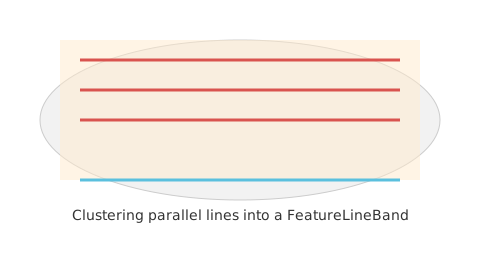
Parallel lines often represent the same underlying geometric feature. We group them into bands by evaluating direction and proximity.

I. Direction Similarity

Two lines can belong to the same band when their directions satisfy:

\[\angle \left(d_{a},\; d_{b}\right)\lt {\theta }_{\text{max}}\]

A typical angular threshold is \(10°\).

II. Centroid Proximity

They must also satisfy the following centroid-distance criterion:

\[\parallel c_{a}-c_{b}\parallel \lt d_{\text{max}}\]

A typical distance threshold is twice the average triangle size.

III. Breadth-First Clustering

Treat each feature line as a graph node, then form bands with breadth-first search (BFS):

  1. Start from an unvisited line.
  2. Add every neighboring line that satisfies both the direction and proximity criteria.
  3. Continue until no qualifying lines remain, then create one FeatureLineBand.

Each resulting band represents one family of parallel feature lines.

Figure 2: Clustering Parallel Feature Lines into Bands.
Salience Scoring

Lines within a band are not equally informative. Assign each line a salience score:

\[S=w_{L}L+w_{C}C-w_{V}V\]

where:

  • \(L\): normalized length
  • \(C\): normalized curvature contrast
  • \(V\): normalized curvature variance

A practical starting point is to assign the following weights:

  • \(w_{L}=1.0\)
  • \(w_{C}=1.0\)
  • \(w_{V}=0.5\)

These weights can be tuned for CAE, CAD, or visualization workflows.

A global threshold filters out lines whose salience is too low.

Selecting a Representative Line

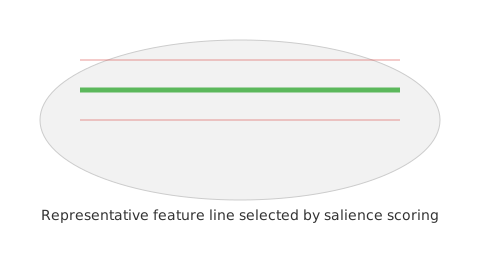
For each band:

  • Compute the salience score of every line.
  • Retain the line with the highest score.
  • Discard the remaining lines in that band.

This process produces one representative feature line per band.

The selected line typically provides the best balance of:

  • Length.
  • Curvature stability.
  • Curvature contrast.
  • Overall structural significance.

This representative line becomes the barrier used by the segmentation stage.

Figure 3: Selecting a Representative Feature Line.
Building Consolidated Feature Edges

Convert each representative polyline back into a set of FeatureEdge objects:

  • Map each polyline to its sequence of face-to-face edges.
  • Use the edges as segmentation barriers.
  • Reuse them for patch extraction.
  • Render them for visualization and validation.

The segmentation stage now receives a sparse, meaningful set of feature lines rather than a dense field of near-duplicates.

Integrating with Mesh Segmentation

During segmentation, consolidated feature lines act as barriers

  • Region growing cannot cross a representative line.
  • The mesh separates into cleaner patches.
  • Parallel lines no longer create over-segmentation.
  • Dense CAE meshes yield more stable and meaningful regions.

This approach makes segmentation robust even on extremely dense meshes.

Implementation Summary

The Part II consolidation module introduces the following functions:

  • clusterFeatureLines()
  • computeLineScores()
  • selectRepresentativeLines()
  • buildConsolidatedFeatureEdges()
  • FeatureLinePipeline::consolidateForSegmentation()

Together, these functions form a complete feature-line consolidation module.

Combined, Part I and Part II produce two complementary outputs:

  • Raw feature lines: dense and geometrically detailed.
  • Consolidated feature lines: sparse, structural, and suitable for downstream processing.

Mesh segmentation uses the consolidated set.

Conclusion

Curvature-based feature extraction captures surface behavior effectively, but on high-resolution meshes it can produce an impractically dense set of lines. The Part II pipeline addresses this problem by grouping related lines, evaluating their salience, and retaining only the strongest structural representative from each band.

This consolidation stage is essential for:

  • Mesh segmentation.
  • Patch extraction.
  • Remeshing.
  • Shape analysis.
  • CAE workflows.

In the next article, we will use these consolidated feature lines to build a robust segmentation system that produces clean, meaningful regions across a wide range of meshes.