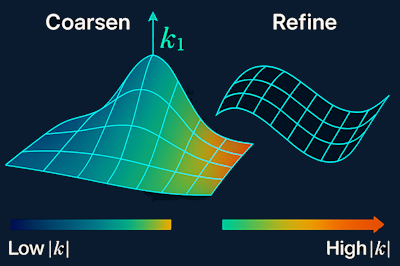
Curvature: The Secret Behind High-Quality Meshes
Introduction
A mesh always reflects the geometry it represents—some are simple, efficient, and ready for simulation, while others appear cluttered, warped, or unstable. The difference usually isn't due to the meshing algorithm, the solver, or the CAD model itself, but a more essential concept: curvature.
Curvature subtly influences element size, orientation, refinement, and even topology. Gaining insight into curvature means understanding why meshes behave as they do. This article introduces curvature from a CAE point of view—as a practical tool rather than purely theoretical differential geometry.
What Curvature Really Means in CAE
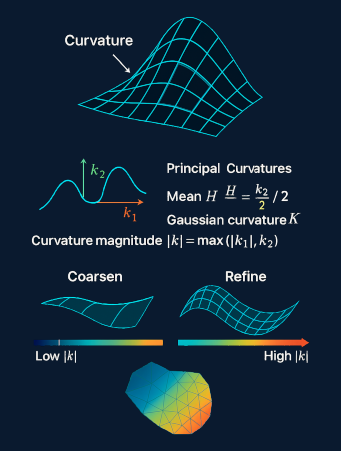
Curvature measures how sharply a surface bends. In simulation, this answers the crucial question:
How much geometric detail needs resolution here?
- High curvature more detail
- Low curvature less detail
This relationship determines:
- Element size
- Element density
- Refinement patterns
- Feature detection
- Segmentation
- Solver stability
Curvature signals where computational resources should be focused during meshing.
Principal Curvatures: The Key Values
Every point on a smooth surface has two main curvatures:
- \(k_1\) : direction of maximum bending
- \(k_2\) : direction of minimum bending
From these come:
- Mean curvature: \( H = \frac{k_1 + k_2}{2} \)
- Gaussian curvature: \( K = k_1 \cdot k_2 \)
- Curvature magnitude: \( |k| = \max(|k_1|, |k_2|) \)
In practical terms:
- High \(k\): sharp features, tight bends, fillets, ridges
- Low \(k\): nearly flat or gently curved regions
These values guide mesh density decisions directly.
Curvature as a Mesh Refinement Method
Most adaptive meshing algorithms use a straightforward principle:
Refine where curvature is high; coarsen where it is low.
This approach:
- Accurately captures geometry
- Avoids extra elements
- Boosts solver performance
- Reduces mesh skew and distortion
The typical function ties element size to curvature magnitude using defined parameters:
\( h(p) = \frac{1}{\alpha + \beta |k(p)|} \)
Where:
- \( h(p) \) = target element size at point \( p \)
- \( |k(p)| \) = curvature magnitude
- \( \alpha, \beta \) = tuning parameters
High curvature small \( h \)
Low curvature large \( h \)
This principle underpins curvature-based mesh refinement strategies.
Utilizing Curvature for Feature Recognition
Not all sharp edges, ridges, or valleys are detailed in CAD models, but curvature can reveal them.
Feature identification through curvature:
- Sharp edges: large jumps between adjacent faces
- Ridges/valleys: elevated curvature along curves
- Flat areas: nearly zero curvature
For this reason, curvature analysis is key for:
- Segmentation
- Extracting feature lines
- Building boundary layers
- Anticipating mesh quality
Curvature acts as a geometric fingerprint.
Predicting Mesh Quality with Curvature
Analyzing curvature fields can indicate:
- Where elements will elongate
- Locations prone to skewness
- Areas likely to require dense refinement
- Potential problem zones in topology
Rather than discovering mesh problems after generation, curvature lets engineers anticipate issues ahead of time.
The Value of Curvature Visualization
Curvature heatmaps are invaluable diagnostics in CAE:
- They immediately showcase high-curvature spots, blends, hidden details, and zones needing refinement, as well as areas suitable for coarser meshes.
- They reveal subtle features that may be invisible in CAD but critical for meshing, such as small fillets, tight bends, or intricate blends.
- They help identify potential meshing challenges before generation, allowing engineers to adjust parameters or simplify geometry proactively.
Such visuals (like heatmaps with segmentation) instantly communicate the structure of the geometry.
Effective Practices for Curvature-Aware Meshing
Curvature heatmaps are invaluable diagnostics in CAE:
- Review curvature before meshing
A fast heatmap check can prevent wasted time.
- Let curvature dictate element size
Allow local curvature to determine necessary detail.
- Pair curvature with feature detection
Use curvature for highlighting; formalize with detection methods.
- Do not over-refine
Curvature data can be noisy—apply smoothing.
- Apply curvature to verify CAD integrity
Unexpected spikes often signal problematic blends, small fillets, defects, or unintended features. Curvature serves as a debugging asset.
Curvature serves as a debugging asset.
Why Curvature Is Essential
Curvature is more than a geometric measure; it's a critical influence behind strong meshes. It dictates:
- Element counts
- Refinement locations
- Simulation accuracy
- Solver reliability
- Computation time
In short, curvature is a critical influence behind strong meshes.
Conclusion
If geometry forms the backbone of CAE, curvature is its guide. It points out where shapes turn, where the mesh must adapt, and where solvers may struggle. Mastering curvature transforms mesh design from guesswork to precise engineering.